
Choosing the right wedding video editing software is less about finding one “best” app and more about matching a tool to how you actually work. Weddings demand strong multicam, fast performance on hours of footage, solid colour and audio, and reliable delivery — and several programs handle all of that well. Here is an honest comparison of the leading options for wedding editors, and how to pick.
What to look for in wedding video editing software
Before comparing names, know your criteria. Good wedding video editing software needs reliable multicam editing, smooth playback on 4K footage (usually via proxies), capable colour tools, proper audio mixing for vows and speeches, flexible export presets, and a stable, well-supported ecosystem. Plugin support and collaboration features matter more as your studio grows. Cost matters too, but it is rarely the deciding factor against the hours these tools save.
Adobe Premiere Pro
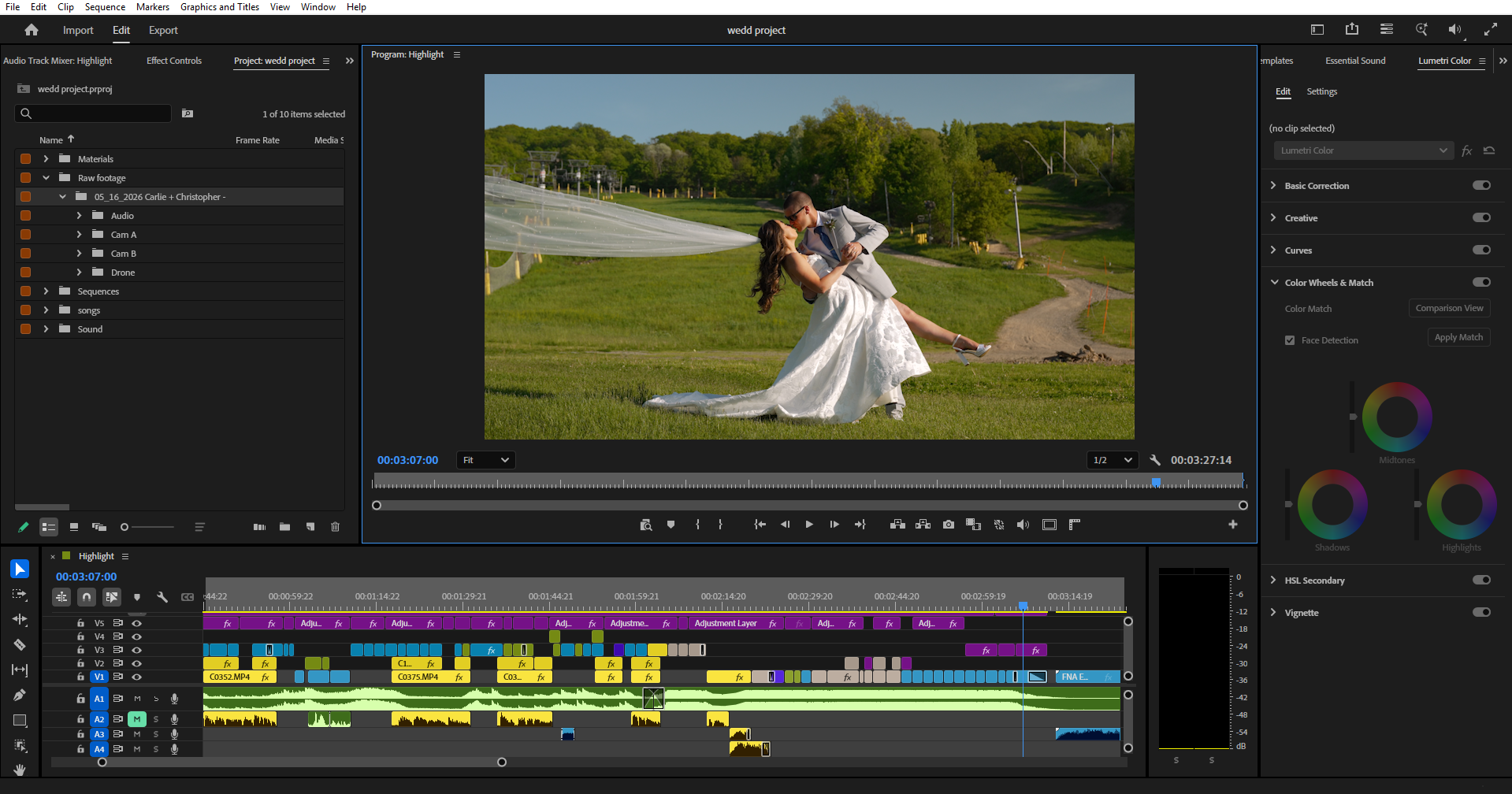
Premiere Pro is the industry standard and what many wedding studios, including ours, standardise on. Its strengths are the ecosystem — tight Dynamic Link to After Effects for motion graphics and Audition for audio — plus the Lumetri Color panel, strong multicam, automatic proxy generation, and the fact that it runs on both Mac and Windows. You can see the full toolset on the Adobe Premiere Pro page. The trade-off is the ongoing subscription and a performance appetite that rewards good hardware.
DaVinci Resolve
Resolve is the colour powerhouse and the best value in the category — its free version is genuinely production-capable. It pairs the deepest grading toolset anywhere (ideal if you take wedding video color grading seriously) with the Fairlight audio suite, all in one app. The edit page has matured into a real competitor for cutting. The catch is that it leans hard on your GPU, and the node-based approach has a steeper learning curve than a panel-based editor.
Final Cut Pro
For Mac shooters, Final Cut Pro is blisteringly fast on Apple silicon and a long-time favourite of solo wedding videographers. The magnetic timeline divides opinion but suits quick, fluid cutting, and it is a one-time purchase rather than a subscription. The limits are platform lock-in (Mac only) and weaker team-collaboration features, which matters less if you edit alone and more if you scale to a studio.
Mobile and budget options
LumaFusion on iPad is surprisingly capable for quick teasers or social cuts on the move, and tools like CapCut or iMovie are fine for rough social content. None of them, though, are built for delivering a full, colour-graded, multicam wedding film to a paying couple — treat them as supplements to a proper editor, not replacements for one.
Plugins and add-ons worth having
Whichever editor you land on, a few add-ons earn their place: a quality transition or LUT pack to speed up your look, audio cleanup tools for noisy reception speeches, and motion-graphics templates for titles. Just resist leaning on flashy presets as a crutch — they date a film fast, and a clean cut almost always beats a busy one.
Which should you choose?
If you are a solo shooter on a Mac who values raw speed, Final Cut Pro is hard to beat. If colour is your obsession or budget is tight, DaVinci Resolve gives you the most for nothing. If you want the industry-standard ecosystem, cross-platform flexibility, and the easiest path to hiring or outsourcing editors who already know the software, Premiere Pro is the safe default — which is exactly why most studios choose it.
The tool matters less than the workflow
Here is the honest truth no software marketing will tell you: a disciplined editor on free Resolve will out-deliver a disorganised one on a fully kitted Premiere rig every time. The wedding video editing software is just the instrument — your wedding video editing workflow is what actually determines speed and consistency. Pick a tool you will commit to learning deeply, then build a repeatable system around it.
Or skip the software decision entirely
There is another option that sidesteps the software, the subscriptions, and the learning curve altogether: hand the editing to a team that already runs all of it. If post-production is the part of the business you would rather not own, outsourcing turns the whole question moot.
Love Story Editing handles the edit for you through our wedding video editing service — no software to buy or learn. Choose a teaser edit, a ceremony edit, or a full wedding film, see the work on our video portfolio, or request a quote.
The takeaway
The best wedding video editing software is the one that fits your platform, your budget, and the way you work — Premiere Pro for the standard ecosystem, Resolve for colour and value, Final Cut for Mac speed. But none of them edits the film for you. Choose one, learn it properly, and build a workflow around it — or skip the decision entirely and let an editing team handle the post-production while you keep shooting.